Creating a Github Pull Request just from a Telegram message
I've been running g-force.com.sg almost entirely on AI, and the latest addition lets me ship a UI change from my phone while lying in bed.
How the site came to be
g-force.com.sg started with a Figma mockup, which I then got Copilot to scaffold and implement in Astro. From there I used Claude to go through the site for page optimization and SEO. One AI suggestion that I didn't think much of at first was creating a separate page for each shop location, the logic being more pages means more indexing. Rather insightful actually, I did see page engagement go up after that.
The annoying part
Once the site was up, the business team started coming to me with small UI changes, and they usually needed it turned around within days. Update the promotion banner for Mother's Day with these new assets, mark a location as temporarily closed, that sort of thing. Individually each change takes me five minutes, but they come in sporadically enough that I'd genuinely forget to do them, or forget where in the codebase to even make the change.
I wanted this automated, so I built a Telegram bot.
Telegram message to PR
The flow is pretty simple:
- I send the bot a message with my prompt
- A Lambda function receiving the webhook takes that prompt and dispatches it to the website repo
- A Github workflow in the repo runs a Claude Code action, which picks up the prompt, makes the change, and opens a PR
The only real prerequisite was an Anthropic API key, which I topped up $5 to get started. I was pretty kiasi, so I added an allowlist of telegram chat IDs that were able to make changes to the lambda, as a very low level kind of authorization.
It works!
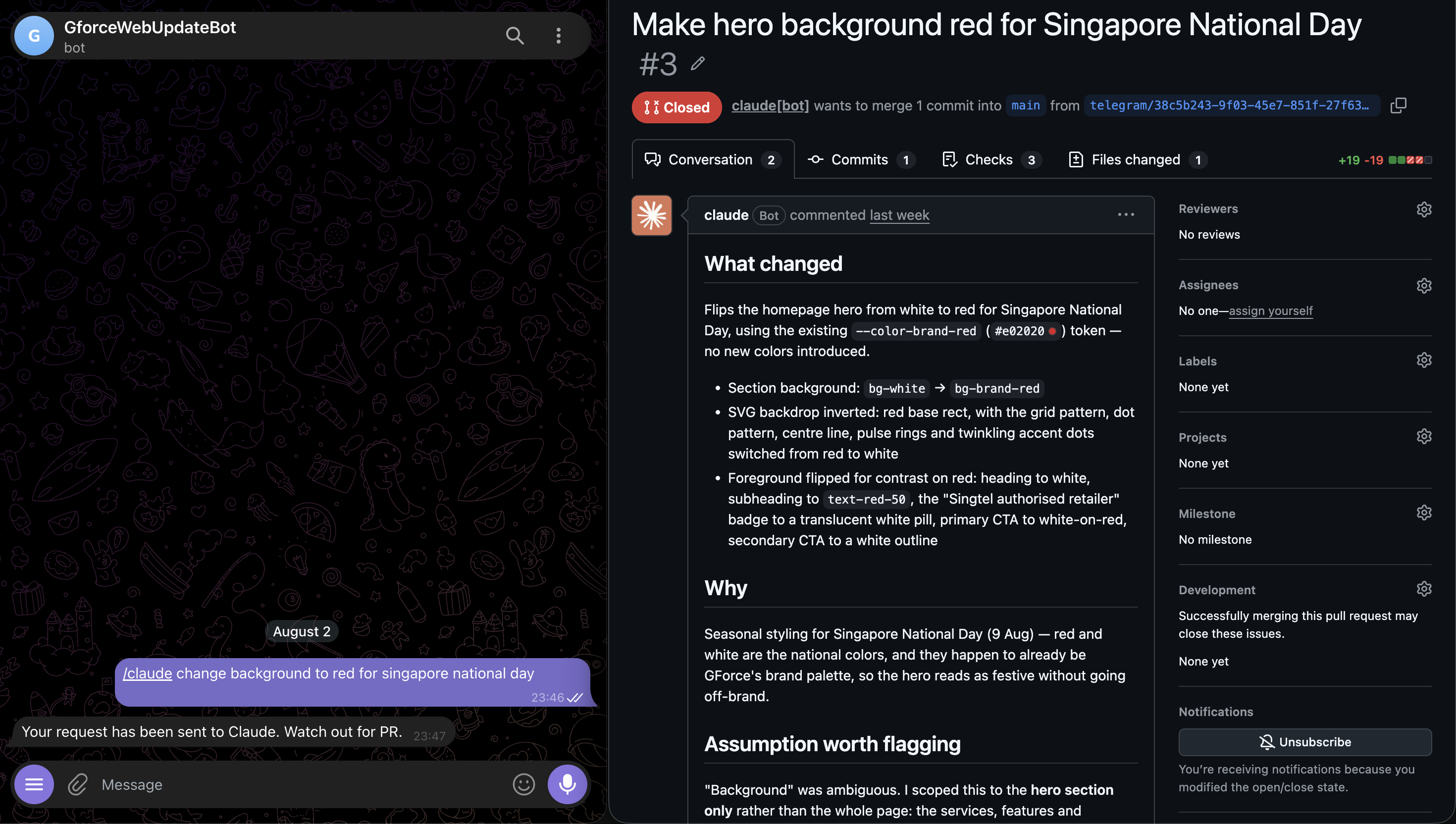

The cherry on top
Because Netlify already builds a deploy preview for every PR, I get a live preview link for free the moment the PR opens, before anything is merged to main. So the loop is: message the bot, check the preview looks right, merge. No local setup, no laptop even required.
Disclaimer
Claude co-authored this by taking my bullet points and making them into paragraphs.
Did you know this was built with 11ty and tailwind? And works even with Javascript disabled? Yeah I don't care either.